There is a moment every performer knows. You are standing in the wings, the room is filling, and somewhere in your pocket or on a table by the mixer sits the single most fragile part of your entire show. Not the props. Not the script. The music.
Get it right and nobody notices, which is the whole point. Get it wrong and the first thing three hundred people learn about you is that your walk-on track did not fire.
So we asked. Two questions, posted plainly into several rooms full of working professionals:
"Entertainer friends, for show music: 1. Which remote do you use? 2. Which app do you use?"
Over seventy five people answered. Magicians, hypnotists, comedians, speakers, cruise ship headliners, mobile DJs, theater stage managers. Some of them have been running the same setup for a decade. Some of them switched last week and are still annoyed about why. A few of them, refreshingly, do not use technology at all.
What came back is the most honest picture of the show audio market we have ever seen, and it is not the picture we expected. Here is all of it, followed by a plain English guide to every app and every remote they named, so that if you are new to this you can leave knowing what each one is and where to find it.
What is in this article
- How we did it
- The apps, ranked
- The remotes, ranked
- Finding one: almost nobody buys a system
- Finding two: the incumbent is free
- Finding three: the one system people love
- Finding four: the trust story nobody planned for
- The workarounds are the roadmap
- The rising challenger
- Every app named, explained
- Every remote named, explained
- If you are starting from scratch tonight
- Ten questions new performers ask
- Ten questions to ask the venue sound engineer
- Ten questions to ask before you buy a PA
- Sharing a stage at a fair
- So what does all of this add up to?
- Go Show Audio, the app
- Why it has to be hardware too
- The commitment
01How we did it
This is not a laboratory study and we are not going to dress it up as one. We asked an open question in several large private groups of professional entertainers and we counted what came back. No multiple choice, no pre-written options, no nudging toward an answer. People typed whatever they actually use.
That method has one real weakness and one real strength. The weakness is that it favors whatever is front of mind, so a product somebody has quietly used for six years without incident may get mentioned less than something they switched to last month. The strength is much bigger: because there were no options to pick from, everything named here is something a real person actually reached for at a real gig. Nobody ticked a box out of politeness.
We have anonymized every response. The quotes are verbatim, typos and all, because the way people write about their gear tells you as much as what they name.
02The apps, ranked
| App | Users | Share | |
|---|---|---|---|
| The leading cue app | 21 | 28% | |
| A remote brand's own app | 16 | 21% | |
| A matched remote and app system | 13 | 17% | |
| A long range remote system | 10 | 13% | |
| QLab | 7 | 9% | |
| iQ Pro | 4 | 5% | |
| Cue Killer | 3 | 4% | |
| Audio Cues | 3 | 4% | |
| Plain iTunes / iOS Music | 3 | 4% |
Named once each, and worth recording because the long tail is the interesting part: Media Monkey, ProPresenter, Media Shout, Mix16 ShowCues, Show Cues, Easy Performer, SoundBoard, Winamp, Best Boy Sound Control, one home made web app, one compact disc, and one gentleman whose answer to "which app do you use" was, in full:
"A human."
Headline showroom performer03The remotes, ranked
| Remote | Users | Typical setup |
|---|---|---|
| The veteran remote brand (all versions) | 16 | Paired with the leading cue app or its own app |
| The matched system's transmitter | 13 | Sold as one system with its own app |
| Long range remote hardware | 10 | Often alongside the leading cue app or QLab |
| Generic cheap Bluetooth | 8 | Amazon clickers, bike media remotes, presentation remotes |
| Flic button | 4 | Paired with the leading cue app or iQ Pro |
| Chubby Buttons | 2 | Paired with the leading cue app or Best Boy |
One mention each: Versa 2, a Keyspan by Tripplite, an Alto Bluetooth receiver, a Bluetooth wrist control, a page turner foot switch, and a QLab Remote. One performer recommended a third party clip accessory for holding whatever remote you already own, which tells you something about how many people are carrying a remote that was never designed to be carried.
04Finding one: almost nobody buys a system
This is the single loudest signal in the data and it took a while to see, because it is hiding in the shape of the answers rather than in any one of them.
Read the responses back and you notice that most people did not name a product. They named a combination they assembled themselves:
"[The veteran remote] 1.0 and [the leading cue app]."
Working magician"Qlab triggered by [the veteran brand's] remote."
Stage performer"Flic remote and [the leading cue app]. So simple."
Comedy hypnotist"[the leading cue app] with cheap remote media controller for Bike"
Illusionist"[A long range remote] and [the leading cue app] for years"
Corporate entertainer"[The leading cue app] and the Chubby Button Remote"
Close-up worker"I use 'audio cues' on my phone or 'Qlab' on a mac, and i use a 'flic' bluetooth button as my remote"
Touring performer"Bluetooth wrist control with Audio Que on my phone."
SpeakerAn app from one company. A remote from a second company. Sometimes a receiver from a third. Held together by Bluetooth pairing, hope, and a pre-show ritual of testing it twice.
Every single one of those people has, at some point, stood in a green room wondering which of the three things was the one that failed. That is not a criticism of them. It is a description of a market that has never offered them anything else.
The exception proves the point
One product in this survey is bought as a single system, and its users talk about it completely differently to everyone else. More on that in section six, and it is the most important thing we learned.
05Finding two: the incumbent is free
The leading cue app has 21 users, more than a quarter of everyone we asked. It is the closest thing this industry has to a default, and one respondent said so outright:
"[This app] is the standard for music control. It's part of Qlab which is used by top shows in NYC."
Comedy hypnotist, 250+ shows in the last eighteen monthsThat is a real position and it deserves respect. But dig into how people run it and something else appears. Several of them are on the free tier and pairing it with the cheapest hardware they could find:
"Same as Jose. For my iPad. [The leading cue app] free. Cheap remote £3"
UK performer"[The leading cue app] and some cheap $17 Bluetooth clicker from Amazon. Simple, but it works"
Variety act"Show cues and $30 Amazon remote."
Family entertainer"I use Alto Bluetooth + a smart phone. 50 $ all"
European magicianAnd then there is the answer that should be printed out and pinned above the desk of everybody who builds products in this space:
"If you want a cheap solution, make an itunes playlist with silent tracks in between your music (mine are 1hr long), then just use any Bluetooth remote and that way all you ever have to do is press next track to get to your next piece of music. Thats a £15-20 solution"
Working professional, UKThink about what that person has done. With no app at all, they have hand built cue based playback out of an iTunes playlist and a next track button. The hour long silences are a manual implementation of "stop and wait for me." It is genuinely clever, it costs almost nothing, and it works.
That is the real price floor in this market. Not the app store price of a competing app. Fifteen to twenty pounds, and a workaround somebody thought up themselves. Any product that wants money has to be visibly, obviously better than that.
06Finding three: the one system people love
Thirteen respondents named the same matched remote and app system. That puts it third by raw count. But count the adjectives instead of the mentions and it is not close:
"[It]. Been using it for two years and it is the best thing ever."
All-star contributor, magic group"[It] is the most magical."
Wedding entertainer"[It]: it's so good"
Danish performer"[It] is the best for me"
Stage magicianNobody writes "it is the best thing ever" about a Bluetooth clicker. So we went looking for why, and one respondent explained it better than any marketing page could:
"[It] is 100% the best. The transmitter and app are all designed from the ground up to work together without fail, unlike other options where it's 3rd party remotes/apps etc."
Touring professionalThere it is. The reason that product generates loyalty is not a feature. It is that somebody finally designed both halves of the problem at the same time, so there is no seam for a show to fall through.
We are going to be honest about something here, because pretending otherwise would insult your intelligence. That is exactly the argument we believe in, and another company got to it first. Being second to a correct idea is not the same as being wrong about it. It does mean we have to be better at executing it, and it means we should say plainly where that system currently wins.
It also has one significant gap, confirmed in the thread by a two year user who was asked directly whether it runs on Android:
"and iPad" ... "no"
Two year user of that system, answering whether it works on iPad and then on AndroidiPhone and iPad only. In a survey where performers named Lenovo tablets and Android burner phones as their show devices, that is a real limitation for a real slice of this audience.
07Finding four: the trust story nobody planned for
We did not ask anybody what they had stopped using. We asked what they use. People volunteered the rest, and this became the most emotionally charged part of the entire survey.
Three respondents named the same brand as something they left.
"after an epic disappointment with [the veteran brand] (never trusting them again). I decided to move into a [long range remote] system. It's like [the veteran brand] on steroids. Complete game changer."
Working professionalThat same person came back later in another thread and explained exactly what happened:
"Used to be [the veteran brand] until I found out they no longer support anything but their newest model, which left me with a paperweight."
Same respondent, second post"Used to use [the veteran brand] but it had too many issues. 250plus shows in the last year and half and flic is still going strong. No issues."
Comedy hypnotist"Just moved to [the matched system]. Still learning it as it is different then the traditional remote. Was using [the veteran brand]"
Stage performerRead the first one again, because the words matter. Not "it broke." Not "it was unreliable." "Never trusting them again." And the reason is not a fault, it is an ending. The hardware still physically exists. The support for it does not.
Now look at the users who stayed, and how they describe their own gear:
"[The veteran remote] 1.0 and [the leading cue app]."
Still running version one"Legacy [veteran remote]"
His own word for it"[The veteran brand's] remote but I modified it so the magnetic trigger is more sensitive. I also use [the leading cue app]."
Performer who fixed it himselfSixteen people still run this hardware. Some of them describe it with a version number, one of them calls his own remote "legacy," and one of them physically opened it up and modified the trigger mechanism to make it fire the way he needed.
These are not complaints about a bad product. They are the sound of people who bought a good product and then watched the ground move underneath it. That is a trust problem, and trust problems do not get solved with a spec sheet.
08The workarounds are the roadmap
The most useful answers in the survey were not the product names. They were the moments where somebody described the clever thing they built to get around a limitation, because every one of those is a feature that does not exist yet.
"I need to read the cue from ten feet away"
"I use itunes and a bluetooth remote. I also use canva to create the song title/cover so I can see it from several feet away."
Corporate performerStop and appreciate what is happening here. This person opens a graphic design tool, designs custom cover art for every single cue, purely so the track name is legible on a phone screen sitting on a table across the room. That is a workaround for a typography problem. Nobody should have to do that.
"My hands are full"
"I run my cruise ship show from IQ Pro. I have a flic button in my shoe, so everything is completely hands free. It runs the video and the audio and functions as my camera on stage. Super easy."
Cruise ship headlinerA button. In a shoe. Because a performer working a big room needs both hands and cannot be seen reaching for anything.
"What if the phone dies?"
"[Long range remote] pro with SD card mode. No app needed"
Touring magicianThis person has deliberately chosen a setup that keeps working when the phone does not. That is not a feature request, it is a risk assessment, and it is the correct one.
"I need more cues visible at once"
"[The leading cue app]. I use my phone because it's still pretty small and I can utilize more hits and things that my show requires."
Verified performerAnd the one that made us laugh, then think
"I had my female assistant. Cue my music from a CD."
Veteran performerWhich is, when you strip away the technology, still the gold standard everybody else is trying to replicate: something reliable that fires on your cue and never asks you to look at it.
09The rising challenger
One name appeared in this survey that was barely on our radar a month ago. Cue Killer picked up three mentions, all recent, all enthusiastic, including one performer who left an established system for it:
"Used to be [a long range remote]. Now switched to cue killer. CRAZY powerful"
Professional entertainer"Just switched to Cue Killer. Added a page turner foot switch. Second show Thursday. I'll see how it goes."
Variety performerThree mentions is not a trend. Three mentions where one of them is a defection from a paid competitor and another is somebody mid-experiment is worth watching closely. We will be watching it closely.
10Every app named, explained
If you are new to this, the two tables above are a list of names with numbers next to them and not much else. So here is the part we wish had existed when we started: every app performers named, what it actually is, who makes it, what it runs on, and the honest reason somebody would pick it over the others.
We have linked to the ones that are not direct competitors. If one of these is the right answer for your show, we would rather you found that out here than after wasting a gig on the wrong tool.
QLab
7 usersQLab is the serious one. It is the software professional theater runs on, and if you have ever seen a show with sound, video and lighting cues all firing in sequence off one operator's spacebar, there is a good chance this is what was doing it. It runs on a Mac, not a phone.
There is a genuinely useful free tier that covers audio, video and lighting cues with unlimited cue lists, and paid licenses that unlock the professional features like multi channel audio, multi screen video, MIDI, network cues and timecode. The performers in our survey who named it are mostly running bigger productions, or triggering it from a USB receiver remote or a Flic while they are on stage.
Best for: theater, big productions, anything where audio is only one of several things that need to fire on the same cue.
Watch out for: you are carrying a Mac to every gig. For a one person show with eight music cues this is a lot of aeroplane for the journey.
qlab.appiQ Pro Show Control
4 usersiQ Pro is the app for people whose show is not only music. It runs audio, video and a live camera feed from the same device, which is why our cruise ship respondent uses it to handle his music, his screen content and his on stage camera at once. Output goes to a screen over an HDMI adapter or wirelessly over AirPlay.
Cues get the full treatment: fade up, fade down, cross fade, loop, level, fade duration, auto start and auto follow, with multiple audio layers running independently. It works with existing show remotes and has specific support for the Flic button, which is the combination that put a button inside somebody's shoe.
Best for: speakers, cruise ship acts and anybody running video and audio together on a big screen from a phone or tablet.
Watch out for: more power means more to set up. If all you need is music cues, this is more app than your show requires.
iqproapp.comCue Killer
3 usersThe newcomer, and the one we are watching most closely. Cue Killer puts slides, audio, live camera, broadcast style overlays and transitions into a single cue list where one GO button fires whatever is next, whatever type of thing it happens to be. Triggers can also be a spoken word or a prop held up to the camera.
It is young. It is distributed through Apple's TestFlight rather than the main App Store, and it needs a recent version of iOS. But one of the three people who named it left a paid competitor to get to it and used the words "crazy powerful," and another is mid-experiment with a foot switch. That is worth paying attention to even at three mentions.
Best for: performers who want to try the most feature dense thing on this list while it is free, and who do not mind being early.
Watch out for: TestFlight builds expire and have to be renewed, and a young product has not yet had the years of gigs that shake bugs out.
cue-killer.comAudio Cues
3 usersOne of the very few genuine answers for Android performers, which alone makes it worth knowing about. Audio Cues lets you build and run simple sound designs for theater, dance, magic and other live performance on an Android phone or tablet, and it takes input from ordinary Bluetooth remotes.
It is not trying to be QLab. It is trying to be the thing that reliably plays your cue when you press the button, on a platform most of this industry has ignored.
Best for: Android users, and anybody who wants a show device that costs less than an iPad.
Watch out for: Android only, so it is no help if you are already on an iPhone.
audiocues.appPlain iTunes and Apple Music
3 usersThree respondents run their entire show out of the stock music player, and one of them explained a method clever enough that we quoted it twice in this article. You build a playlist of your cues, drop an hour of silence between each one, and then a plain next track button on any cheap remote becomes a GO button. The silence is doing the job that a wait-for-go setting does in a real cue app.
It costs nothing, it has no learning curve, and it will not crash because it is the most tested audio software on the device. It is also the honest floor that every paid product in this list has to beat.
Best for: a first paid gig, a simple set with a handful of tracks, or a backup plan that lives on your phone anyway.
Watch out for: no fades, no trim points, no per track levels, and one mis-press skips into an hour of silence in front of an audience.
The long tail, named once each
These came up a single time apiece. Some are full professional tools that simply are not fashionable in this corner of the industry, and one or two are people making do brilliantly with something never designed for shows.
MiX16 Show Cue
Audio, video, image, MIDI and lighting cues in one app, with a Lite version capped at 50 cues and a Pro version with unlimited cues and no subscription. A good middle ground if you want more than music but do not want to carry a Mac.
mix16showcue.comShow Cues
Built specifically around live show sequencing, with auto play and programmable delays between tracks so a scene change can run without anybody touching anything.
Show Cues Pro on the App StoreEasy Performer
An audio, video and lyrics player aimed at live musicians. Setlists, per song settings, fade outs, looping, on screen lyrics and an optional MIDI add on. One of the few things in this whole article that runs on both platforms.
easyperformer.comBest Boy Sound Control
An Android show player aimed directly at magicians, dancers and stage performers. Per track volume, a talk function that ducks the music to a preset level, a hard stop, and support for Bluetooth or USB OTG remotes and presenters.
Best Boy on Google PlayProPresenter
A full live production and presentation package, built originally for houses of worship and now used for conferences, broadcast and sport. Enormous capability, and enormous overkill for eight music cues.
renewedvision.com/propresenterMediaShout
The other long standing church presentation system, running lyrics, slides, video and audio from one control screen with a separate stage display. Same story as ProPresenter: it arrived in this survey because a performer already knew it from another job.
mediashout.comMediaMonkey, Winamp and SoundBoard
Three respondents run their shows from general purpose media players on a laptop. These are library and playback tools with no concept of a cue, so everything the show needs is happening in the operator's head. They are on this list because they are what a real professional actually used at a real gig, which was the whole point of asking.
mediamonkey.comA home made web app, and a compact disc
One performer built his own web app because nothing on the market did what he wanted. Another runs his show off a CD cued by an assistant. Between them they cover both ends of this industry perfectly.
11Every remote named, explained
The remote is the half of this that people research least and regret most. It is also the half that fails in front of an audience, because the app is sitting still on a table and the remote is the thing being carried, dropped, sweated on and pointed across a room full of bodies.
Here is every piece of hardware performers named, and what it is really like to live with.
Generic Bluetooth clickers
8 usersThe quiet giant of this survey. Eight working professionals run their show music off a remote that costs between about 3 pounds and 50 dollars and was designed for something else entirely: skipping tracks on a bicycle, taking selfies, or advancing slides in a meeting room. They send standard media or keyboard commands, which is precisely what a cue app is listening for, so they work.
Do not be snobby about this. A 17 dollar clicker that has never once failed is a better remote than an expensive one you do not trust.
Best for: starting out, second remotes, and spares in the gig bag. Buy two, they are cheap.
Watch out for: no confirmation that the press landed, pairing that sometimes wanders off between shows, batteries with no warning, and short range once a room fills with people.
Flic button
4 usersA small round button built for smart homes that this industry quietly adopted. It handles single press, double press and long press as separate commands, and it will stick to a surface or clip to clothing, which is how one cruise ship headliner ended up running an entire show from a button in his shoe.
The comedy hypnotist who left another brand for a Flic reported over 250 shows in eighteen months with no issues, which is the kind of number that means more than a spec sheet.
Best for: hands free setups, hidden triggers, and anybody who wants a button somewhere unusual.
Watch out for: it is a general purpose product, so the show specific behavior lives in whatever app you point it at. Check your app supports it before buying.
flic.ioChubby Buttons 2
2 usersDesigned for skiers and cyclists wearing gloves, which turns out to be a very good design brief for a performer as well. The buttons are large and raised enough to find by feel without looking, it straps to a wrist or sticks to a flat surface, and it is built to be knocked about.
Best for: anybody who has ever fumbled for a small remote in a pocket while walking on to applause.
Watch out for: like any Bluetooth media remote, it is sending generic commands, so how well it behaves depends entirely on your app.
chubbybuttons.ioPage turner foot switches
named onceMusicians have had this problem solved for a decade. Bluetooth page turning pedals send programmable keystrokes, which means they will happily drive a cue app instead of sheet music, and they leave both hands completely free. One respondent added one to his new setup the week we asked.
Best for: seated performers, musicians, anybody working with their hands full.
Watch out for: a pedal on a stage floor is one more thing to place, tape down and remember.
airturn.comAlto Bluetooth receiver
named onceWorth explaining because it solves a different problem to everything else here. This is a small rechargeable box that takes a Bluetooth audio stream from your phone and gives the venue proper XLR outputs, so the sound engineer gets a real cable instead of a headphone lead and an apology. Alto lists around 100 feet of range and about 6 hours of battery.
One European magician in the survey runs his entire show on this plus a phone for around 50 dollars all in.
Best for: getting audio out of a phone and into a PA system without a trailing cable.
Watch out for: your show audio is now travelling over Bluetooth to reach the speakers, which is one more radio link between you and the room.
altoprofessional.comQLab Remote
named onceNot hardware at all. It is an app on your phone that drives QLab running on a Mac over the network, so the operator can walk away from the desk. Relevant to this survey mostly as a reminder that a phone is a perfectly good remote if there is something reliable at the other end.
qlab.appThe rest, one mention each
A Keyspan presentation remote, from a product line that has long since been discontinued, still turning up at gigs. A "Versa 2," which we could not confidently identify and are not going to guess at. A Bluetooth wrist control paired with an Android show app. And a third party clip, bought purely to make an existing remote carryable, which tells you plenty about how few of these were designed to be carried at all.
12If you are starting from scratch tonight
Everything above is what people use. This is what we would tell a working performer who has a paid gig this weekend and no setup at all. No affiliate links, no upsell, and yes, some of these answers are not us.
| Your situation | Sensible starting point | Roughly what it costs |
|---|---|---|
| iPhone, first paid gigs, almost no budget | A free cue app plus a cheap Bluetooth media clicker. Test it twice before you leave the house. | Under 50 dollars |
| You are on Android | Audio Cues or Best Boy Sound Control with a generic Bluetooth remote. Most of the popular options simply do not exist for you. | Under 50 dollars |
| You want one system and never to think about it | A product where the app and the remote come from the same company, so nobody can blame anybody else when a cue misses. | Hardware pricing |
| Your show has video or slides as well as audio | iQ Pro on a tablet, or QLab if you are willing to carry a Mac. | Varies by license |
| You cannot risk the phone being the single point of failure | Hardware with a microSD or SD card playback mode, so the box plays the show if the phone does not. | Hardware pricing |
| Big room, long distances, radio interference | Something on a dedicated RF link rather than Bluetooth, and test it in the actual room. | Hardware pricing |
The one piece of advice everybody agrees on
Whatever you buy, carry a backup that does not share a failure with your main setup. If your show runs from an app on your phone, keep the tracks in a plain playlist on the same phone as well. If your remote is Bluetooth, have a spare set of batteries or a second cheap clicker in the bag. Nobody in this survey said this out loud, but almost every setup they described has a fallback buried in it somewhere.
13Ten questions new performers ask
Choosing an app and a remote is only half of running your own sound. The other half is everything that happens between your device and the room, and it is where most first year mistakes live. These are the ten questions that come up again and again, answered plainly.
01How do I trigger audio cues from the stage hands free or discreetly?
Use dedicated show control software paired with a pocket RF remote or a foot pedal. Program single press play and stop actions so you never have to look down or tap a screen during the performance. The goal is one button that does one thing, so your hand can find it without your eyes.
02Is Bluetooth reliable for triggering show music live?
It is the weakest link in most setups. Bluetooth adds latency, it is vulnerable to interference in a room full of phones, and power saving can put a remote to sleep between cues. Where you can, run a wired connection from your playback device to the sound system, and prefer a dedicated RF remote over a Bluetooth one. Plenty of professionals do run Bluetooth clickers successfully, but they are the ones testing twice before every show.
03Should I plug straight into the venue snake, or use a DI box?
Use a DI box, or an interface with balanced XLR outputs. Phones and tablets put out a high impedance, unbalanced signal that picks up noise and hum over any real distance. A DI converts it to a low impedance balanced signal that will travel hundreds of feet to the mixer cleanly. This one piece of kit fixes more show audio problems than anything else you can carry.
04How do I stop track volumes jumping wildly between cues?
Fix it before gig day, not during the show. Normalize every track to the same target level, around 6 dB below peak, so the whole set is consistent. Then leave your app's master volume free for room adjustments only. If you are riding the volume control between cues, the problem is in your files, not in the venue.
05How do I hear my music and my voice clearly without feedback?
Keep the main speakers in front of your microphone and angled away from the stage. For monitoring, in ear monitors keep sound off the stage entirely, which is the cleanest answer. If you are using a wedge, set it low and place it in the dead spot behind a cardioid microphone, which is the direction that microphone hears least.
06Should I send one combined feed or separate mic and music feeds?
Separate, every time you have the option. Giving front of house one output for your voice and another for your tracks lets the engineer lift your vocal over the music as the room changes. Handing over a single mixed feed means nobody can fix a balance problem once the audience is in.
07Why does my audio sound distorted, or almost silent, at the mixer?
That is a mic level versus line level mismatch. A microphone sends a very weak signal that needs a preamp. A phone or player sends a much stronger line level signal. Put a line level source into a mic input and it clips and distorts. Put a microphone into a line input and you can barely hear it. Match the source to the right input, flip the channel switch, or use a DI box with a pad.
08What is the best backup plan if my playback device fails?
A second device running the same set list in the same app, plugged into a second channel and ready to go. If you only carry one phone or tablet, at minimum have a backup device powered on, unlocked and connected, with your tracks in a plain playlist so somebody can hit play manually. The backup has to be something that does not fail for the same reason the main one did.
09What should I carry for hum and ground loop problems?
A DI box with a ground lift switch. Venue power is regularly shared with lighting rigs, kitchen equipment and refrigeration, and that shows up as a 60 cycle hum in your audio. Flipping the ground lift breaks the loop and the hum usually disappears on the spot. It costs very little and it will save a show.
10How do I sound check quickly when I am running sound alone?
Play a track with plenty of high and low content, then walk out into the audience area with a wireless microphone and set the main output level and EQ from where the audience will be sitting, not from the stage. Once the room sounds right, go back and set your monitor or in ear mix so you can hear your own voice comfortably over the track.
14Ten questions to ask the venue sound engineer
Working with a front of house engineer or a house tech is a partnership. You know what your show needs artistically. They know the room, its acoustics and the limits of the gear in it. Ask these ten questions at load in and most of the things that go wrong at eight o'clock never happen.
01"Where would you like my audio playback outputs plugged in?"
Why ask: every venue runs stage audio differently, whether that is stage boxes, a digital snake or direct inputs at the console. Asking first saves load in time and stops you trailing cable across somebody else's working area.
Expect: they will point you at specific XLR drops on the stage box, or hand you DI boxes patched to dedicated stereo channels.
02"Do you want separate mic and music feeds, or one pre mixed output?"
Why ask: separate feeds give the engineer full control of your voice over the music, but a small setup or a fast turnaround sometimes wants a single feed instead.
Expect: most professional engineers want them separate. Channel one for speech, two and three for stereo music, so they can EQ your voice and ride it against the tracks for that room.
03"Are you supplying the wireless mic, or should I run my own?"
Why ask: the house mic is already frequency coordinated for the building, but your own may be better quality and set up the way you like it.
Expect: if you use theirs, they hand you a transmitter and tell you the battery state. If you use yours, they will ask whether your receiver is putting out mic or line level, and check your frequencies against the house systems.
04"How should we signal each other during the show?"
Why ask: agreeing a discreet signal before doors means you never have to break character to ask for more monitor, or to stop a track that fired early.
Expect: simple visual signals. A hand to the ear and a thumb up or down for monitor level, a thumbs up before a cue, and an agreed gesture for stop everything.
05"What are we set up for today, wedges or in ears?"
Why ask: wedges change where you can safely stand with a live microphone. In ears mean checking transmitter levels instead.
Expect: they will show you where the wedges are and which mixes are available, or hand you a dedicated auxiliary line for your in ear transmitter.
06"Is phantom power live on the lines I am plugging into?"
Why ask: 48 volts arriving at a playback device, an interface or a laptop output can cause a very loud pop and in some cases damage the gear. This is the question nobody asks until the first time it costs them.
Expect: a straight answer about whether phantom is global on that console or switchable per channel, and a confirmation that it is off on your playback channels.
07"Is my vocal channel already set, or shall we do a quick line check?"
Why ask: you need to hear your own voice at full performance volume before an audience is in the room, not after.
Expect: a thirty second check where you speak at your loudest performance level while they set gain, high pass and compression, and find the point where the room starts to ring.
08"How does this room handle low end, and should I trim my tracks?"
Why ask: a boomy room or an enthusiastic subwoofer will bury spoken word under your own music, and you will not hear it happening from the stage.
Expect: they will tell you whether the room is resonant, and either apply a low cut at the console or ask you to pull the bottom end down at your source.
09"What is the hard deadline for tech before doors?"
Why ask: the house schedule is not negotiable and you need your check finished and the stage clear before the first guest walks in.
Expect: a specific time, for example doors at seven so sound check ends at six thirty. Write it down and work backward from it.
10"Where will you be during the show if I need you?"
Why ask: if a microphone dies or a track stops, you need to know which direction to look without scanning the room.
Expect: they will point out the front of house desk in the audience, or the tech position in the wings, and tell you who is actually on it during your set.
15Ten questions to ask before you buy a PA
Sooner or later somebody books you into a room with no sound system at all, and you become the sound company. At that point every pound of gear, every cable choice and every speaker specification affects your load in, your reliability and how professional your show sounds. These are the ten questions to put to a dealer, a private seller, or yourself, and what a good answer looks like.
01"What is the continuous RMS power rating, not the peak?"
Why ask: peak or max watts is a marketing number describing an instant. Continuous RMS power is what the system will deliver cleanly across a two hour show.
Look for: roughly 300 to 500 watts RMS per side for indoor rooms of 100 to 300 people. Ignore anything advertised only as "2000 watts peak."
02"What is the dispersion pattern and coverage angle?"
Why ask: you need wide horizontal coverage so the back corners hear your words clearly without deafening the front row.
Look for: conventional cabinets typically cover about 90 degrees horizontally by 60 vertically. Column array systems often claim 120 to 180 degrees horizontally, which suits wide banquet room seating much better.
03"Is this active or passive, and what does the cabling look like?"
Why ask: active speakers have the amplifier built into the cabinet. Passive ones need a separate amplifier, a rack and more cable.
Look for: active is the standard for solo performers. Check it uses balanced XLR or TRS connections rather than consumer RCA or 3.5mm jacks.
04"How heavy is the heaviest single piece?"
Why ask: you are the one lifting it into a vehicle at midnight, on your own, tired, usually up a ramp.
Look for: modern class D powered cabinets with neodymium drivers keep a 10 or 12 inch box in the region of 25 to 35 pounds. Check column systems break down into padded bags you can carry over a shoulder.
05"What inputs, outputs and onboard mixing does it have?"
Why ask: this decides whether you can plug a microphone and your playback straight in, or whether you are also carrying a mixer.
Look for: at least two combination XLR and quarter inch mic or line inputs, individual gain controls, signal and clip indicators, and an XLR through output so you can feed a house system or a second speaker.
06"How does it handle voice against music?"
Why ask: spoken word needs clean mid range and intelligibility. Music wants bottom end. A system tuned only for music will make you sound muddy.
Look for: onboard DSP presets for speech, live and music. Then test it, speaking through a wireless microphone at full performance volume, and listen for mud in the low mids or harshness in the upper mids.
07"Does it have Bluetooth, and can it be turned off?"
Why ask: a system that will pair with anything is a system a guest can pair with during your show. It happens more often than you would think at weddings.
Look for: a wired feed as the primary path, and Bluetooth that either requires a physical button press to pair or can be disabled entirely in the settings.
08"What is the maximum SPL before it clips?"
Why ask: maximum SPL tells you how loud the system gets in decibels before distortion or the limiter takes over. Headroom is what keeps speech clear when the room gets noisy.
Look for: a rating of at least 120 to 126 dB. More headroom means you are never pushing the amplifier into clipping just to be heard.
09"What happens when the audience doubles?"
Why ask: the system that fills a 50 seat function room has to be able to grow into a 400 seat banquet hall without you buying everything twice.
Look for: the ability to link a second matching speaker over XLR, add a powered subwoofer, or daisy chain extra column units without the signal degrading.
10"What is the warranty, and can it be repaired?"
Why ask: touring gear gets knocked, bounced in a vehicle and run hard. When a driver blows or an amplifier module cooks, you need it back quickly.
Look for: established commercial audio brands with three to five year warranties and parts you can actually get, rather than an unbranded system with no service network behind it.
16Sharing a stage at a fair
Fairground work is its own discipline. You are outdoors, the noise floor is a midway, the turnaround between acts is measured in minutes, and you are sharing a stage footprint with somebody whose gear is as important to them as yours is to you. Everything that is merely annoying indoors becomes the reason a set fails out here.
Ten things that decide how the day goes.
01Split the console so nothing gets repatched
The problem: you cannot be pulling cables and resetting EQ between sets with an audience already sitting in front of the stage.
Do this: treat the mixer as two separate systems. Channels one to four belong to the first act, five to eight to the second, microphones, tracks and DI boxes included. Changeover becomes muting one bank and unmuting the other. Never share a wireless microphone or a channel strip setting between acts.
02Coordinate frequencies in a very noisy RF environment
The problem: a fairground is full of radio. Ride telemetry, vendor walkie talkies, security, news crews, and now two performers with their own transmitters bleeding into each other's receivers.
Do this: switch every receiver on before any transmitter and scan for clean frequencies. Agree with the other act to keep your transmitters at least 1 to 2 MHz apart. Switch your transmitter off the moment your set ends so you are not sitting on their signal.
03Give each act its own footprint
The problem: fair stages fill up fast with props, banners, tables and gear, and a blocked lane costs you minutes you do not have.
Do this: agree a stage left zone and a stage right zone and keep to them. Case lids and spare props live off stage. Run one main power trunk taped along the back edge so nobody is stepping over loose cable during a set.
04Budget for wind, noise and lost headroom
The problem: outdoors there are no walls to hold the sound in, and rides, generators, crowd noise and wind eat your gain before it reaches the back row.
Do this: bring more amplifier headroom than an indoor room of the same size would need. Foam windshields on every headset and handheld microphone. High pass filter at 80 to 100 Hz on vocal channels to lose the wind rumble without thinning your voice.
05Expect feedback where you would not get it indoors
The problem: the system is turned up harder than usual, and sound bouncing off a stage cover or a back banner into an open microphone will ring instantly.
Do this: keep wedges low and pointed at the dead spot behind your cardioid microphone. Better, use in ear monitors and take the stage volume to nothing, which also stops midway noise washing into your front of house mix.
06Treat the power as suspect until proven otherwise
The problem: fair power is temporary runs, diesel generators and long extension leads shared with fryers and heavy machinery. Voltage dips and dirty grounds mean hum, or digital gear rebooting mid set.
Do this: run everything through a line interactive power conditioner or a UPS with voltage regulation. Never share a circuit with vendor equipment, lighting dimmers or refrigeration.
07Agree the changeover before the first show of the day
The problem: fair schedules are ruthless. Five minutes of overrun by one act comes straight out of the next act's line check or performance time.
Do this: set a routine and a timer. Five minutes to clear the stage, five for the next act's line check, five of buffer. One person, ideally the stage manager, gives five minute and one minute visual calls from the wings.
08Protect the gear from sun, rain and heat
The problem: direct sun, a sudden shower, humidity or dust will kill interfaces, laptops and receivers. A phone or tablet running your show software will overheat and shut down in full sun in minutes, which is the single most likely way your audio dies at a fair.
Do this: keep control hardware, laptops and receivers shaded under a canopy or a reflective cover. Carry a small USB fan for the mixer area. Have plastic sheeting staged behind the speaker stacks before you need it.
09Know the noise ceiling and share it fairly
The problem: many fairs have hard decibel limits because of livestock, a neighboring grandstand event or a local ordinance, and a complaint caused by one act penalizes both.
Do this: set a limiter on the master output or in the speaker DSP. Walk the seating area before gates open and establish the loudest you are allowed to be. Agree that ceiling with the other act out loud.
10Know how the show gets stopped
The problem: a fairground is a public safety environment. Management may need the PA immediately for a lost child, a weather warning or a medical emergency.
Do this: find out where the venue override or emergency microphone lives, or keep a labeled open channel on your mixer for fair announcements. Make sure both acts know how to mute playback instantly and step away from the microphone when the stage manager signals.
17So what does all of this add up to?
Put the four findings next to each other and the conclusion writes itself.
- Most performers are running a system they assembled themselves from two or three companies that have never spoken to each other.
- The cheapest version of that works well enough that a seventeen dollar clicker is a legitimate competitor, which means anything paid has to be dramatically better, not slightly better.
- The one product that designed both halves together is the only one whose users write about it with genuine affection, and it does not serve Android at all.
- Trust, once broken, is the thing people remember. The loudest negative feedback in the entire survey was not about a product failing. It was about a product being left behind.
Which brings us to the thing we have been building, and why we changed our minds about what it needed to be.
18Go Show Audio, the app
We started where most people start, with software. Go Show Audio is a cue playback app built specifically for performers rather than adapted from something else, and a lot of what is in it exists because of exactly the problems above.
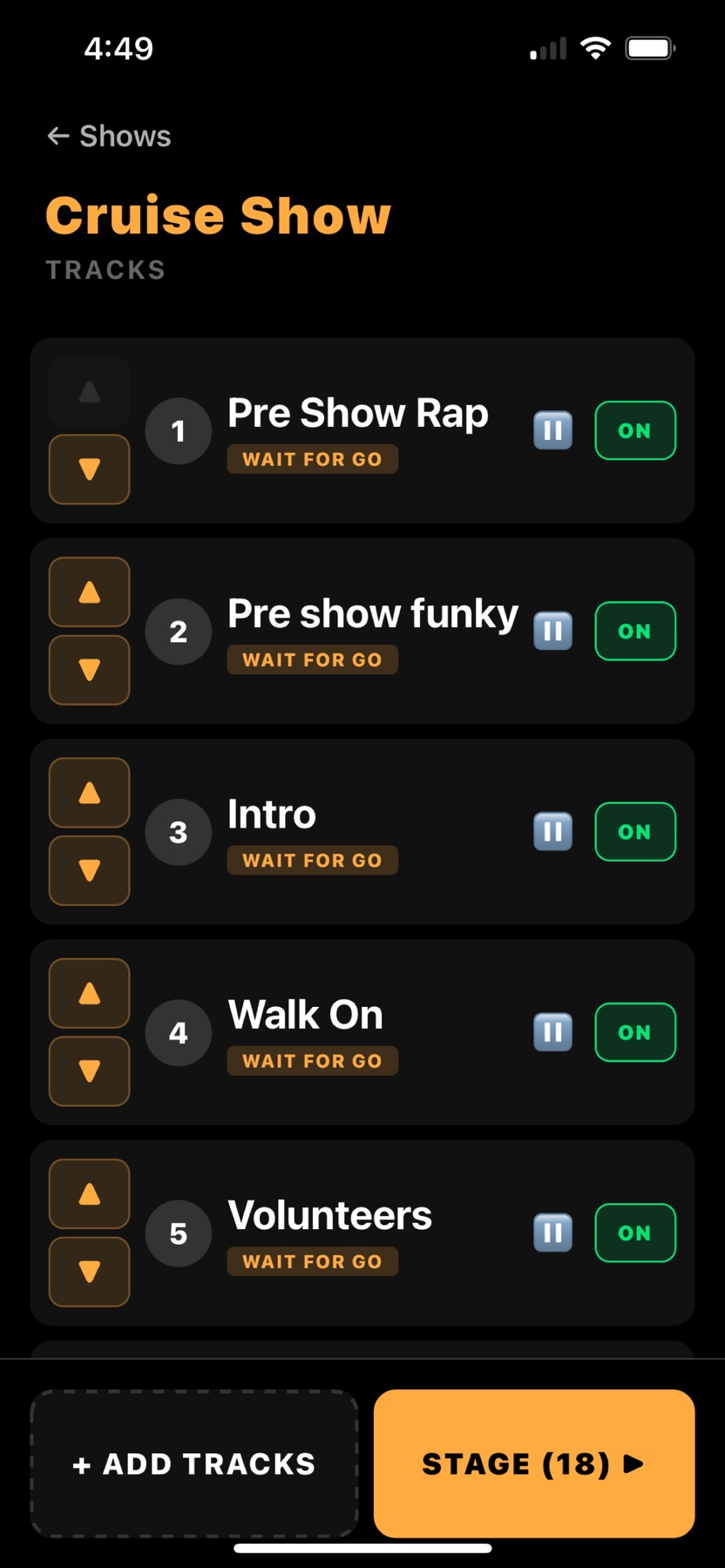
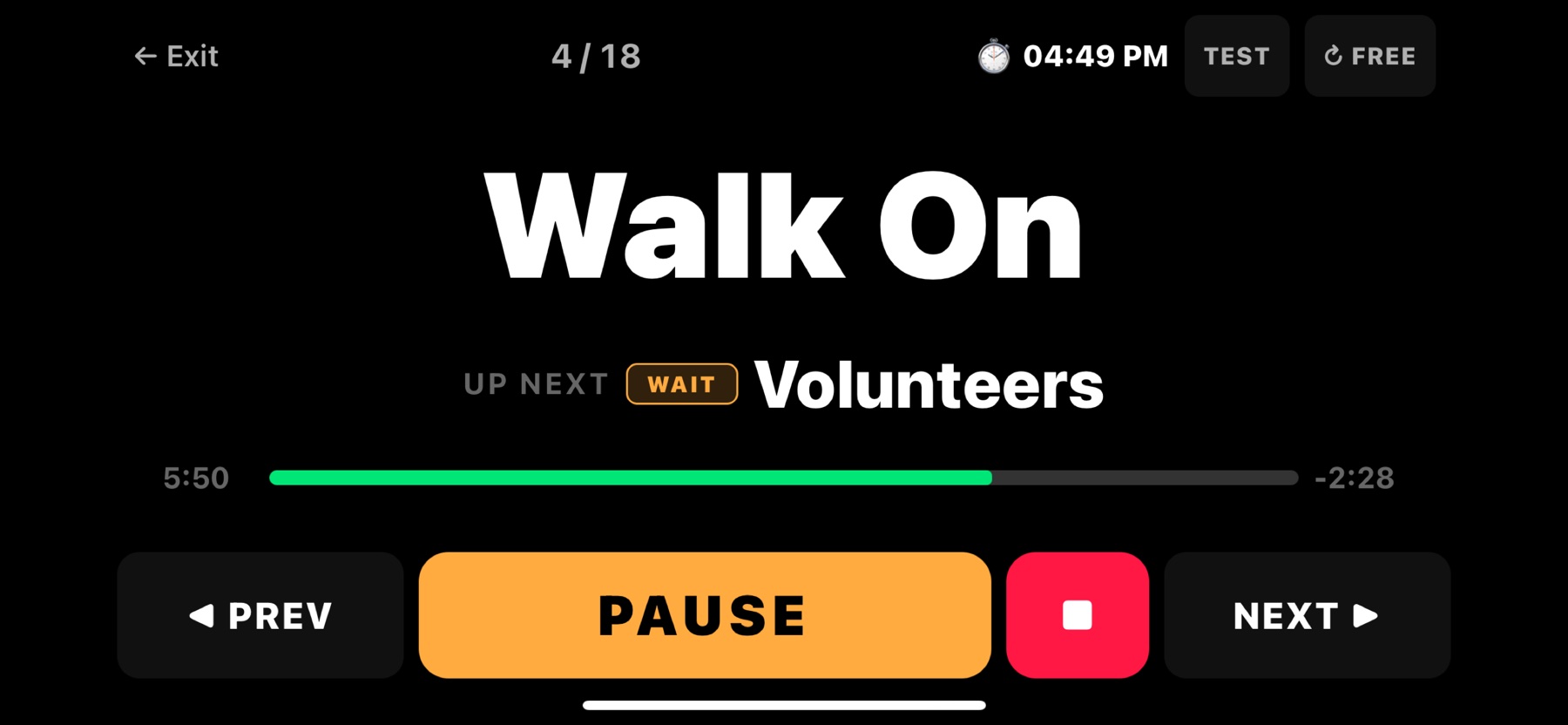
Look at that second screen against the performer who was designing Canva artwork to read his track titles from a distance. The cue name fills the display. The next cue is always on screen. The remaining time counts down on the right. You can read it from across a green room without walking over to it, and you never have to wonder what happens when this track ends.
The rest of what is in there, and why:
- Fully offline. Your tracks live on the device. No venue WiFi, no cellular, no buffering, no cloud outage in the middle of a show.
- Multiple shows. A corporate set, a theater show and a birthday party each kept separate, switched between in seconds.
- Wait for go on every cue. Playback stops at the end of each track by default. No accidental skips into the next piece of music, which is the single most common way a show audio setup embarrasses you.
- Per track volume, fades and trim points. Set the in and out points and the level for each cue in the app. No external audio editor, no re-exporting files the night before a gig.
- Stage first interface. Huge buttons, high contrast, landscape, and the same layout on iPhone and iPad.
- Works with the remote you already own. Bluetooth and USB remotes, clickers, key fobs, foot pedals. We did not want anybody to have to throw away working hardware to try the app.
That last point was, for a long time, our whole philosophy. Be the best app, play nicely with everybody's existing remote, let people keep their gear.
This survey is what changed our minds.
19Why it has to be hardware too
You cannot read over seventy five answers, watch most of them describe a two vendor Frankenstein, then read one man explain that the reason his system never fails is that somebody designed both halves together, and carry on believing that software alone is the answer.
The seam between the app and the remote is where shows break. You cannot fix a seam from one side of it.
So we are building the other half.
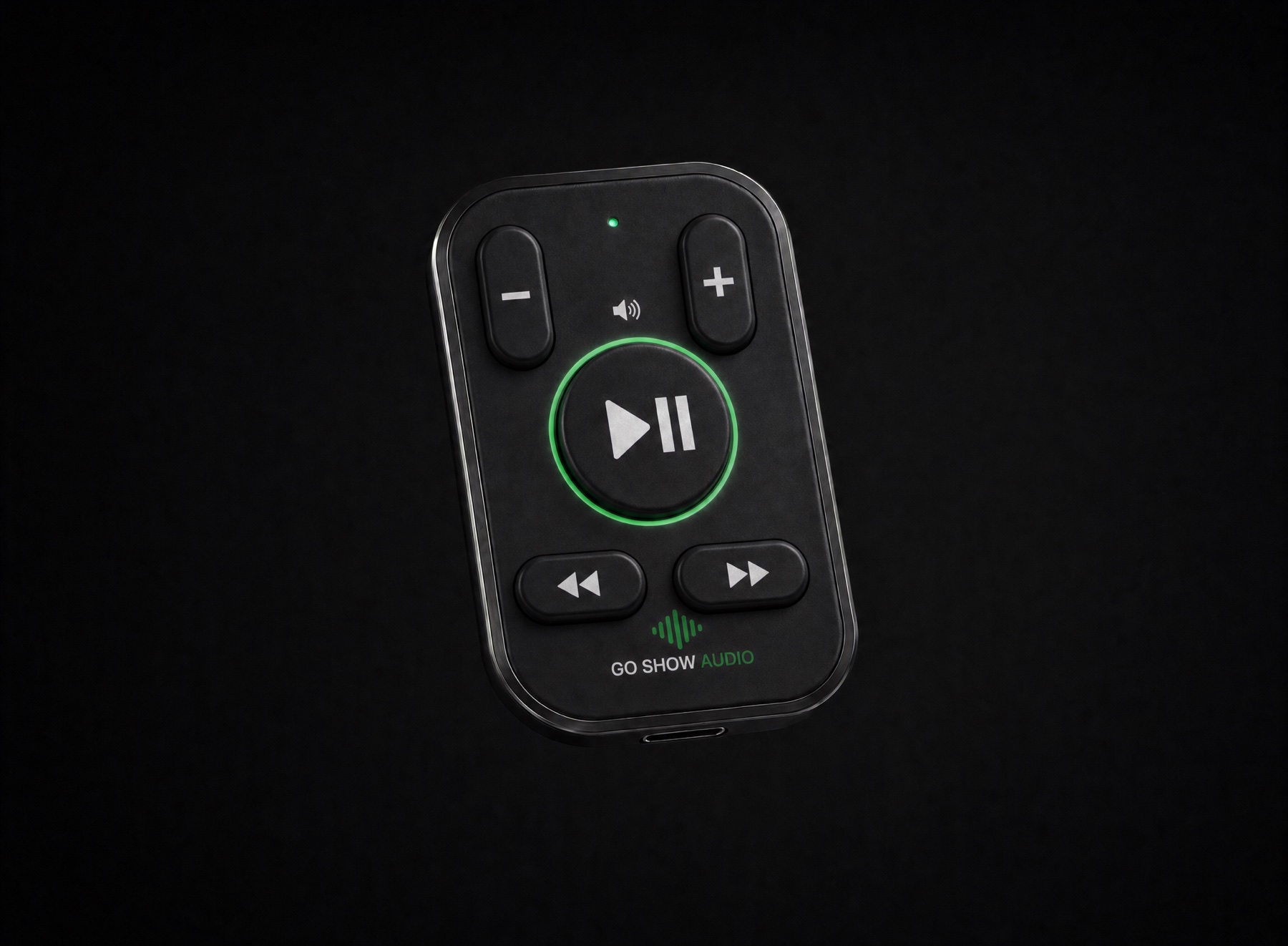
The design brief came straight out of the answers in this article. Buttons you can find by feel with your hand in a pocket, because nobody should be looking down. A shape and weight that survives being carried every night, because the performer who bought a clip accessory to hold his remote told us the current options were not designed to be carried. And a status ring that confirms the command actually landed, because the fear that it did not is the reason people test twice before every show.
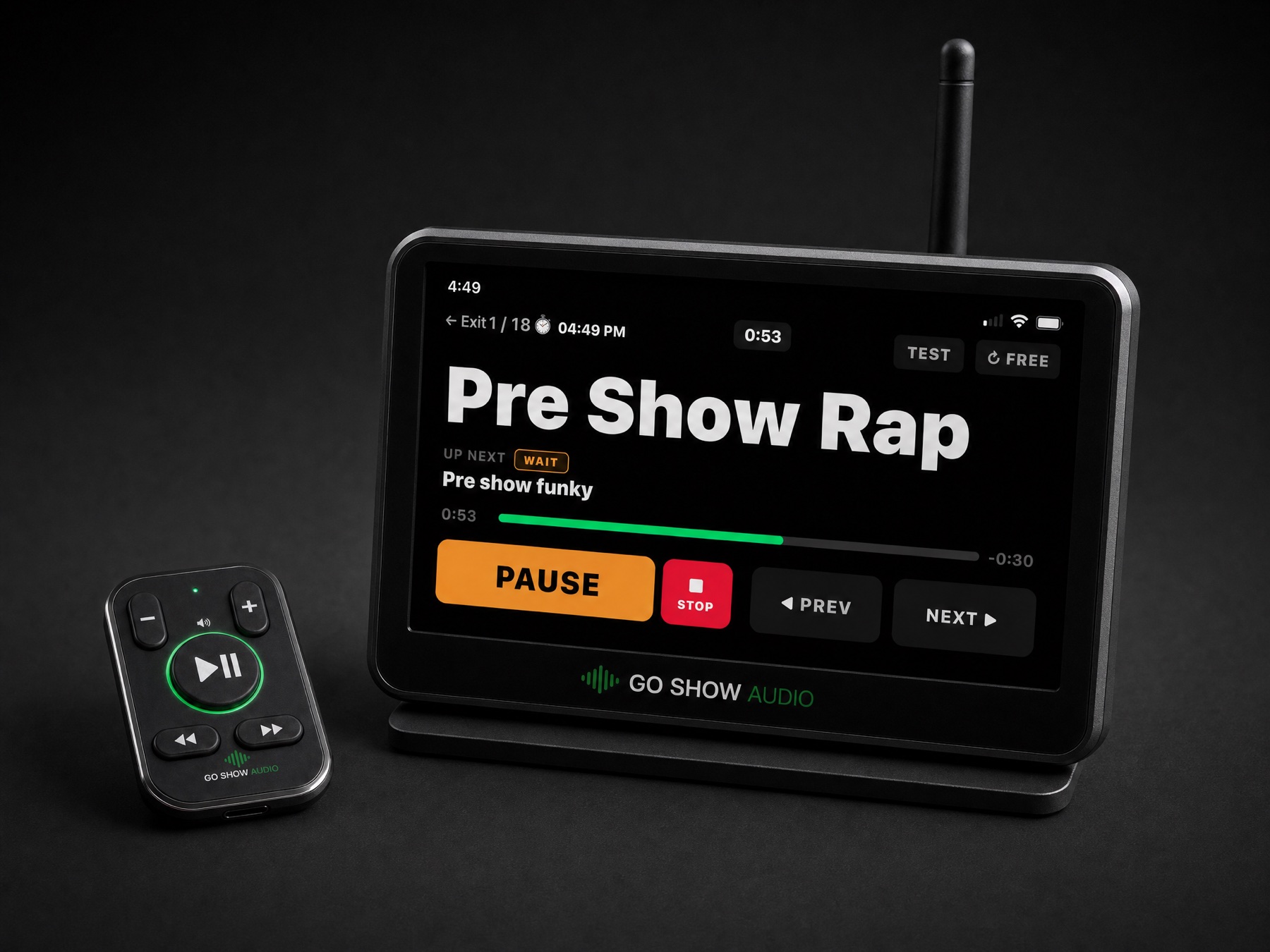
The receiver is the part that answers the two hardest problems in the survey at once. It talks to the app on your phone or tablet, which is how most people want to work. And it plays audio on its own, with no app and no phone involved at all, which is the answer to the performer running SD card mode because he has thought seriously about what happens when a phone dies mid-show.
Look at the screen in that render. It is the same stage view as the app: the cue you are in, the cue that is coming, the time remaining, and nothing else competing for your attention. Whether the audio is coming from your phone or from the box itself, you are reading the same thing.
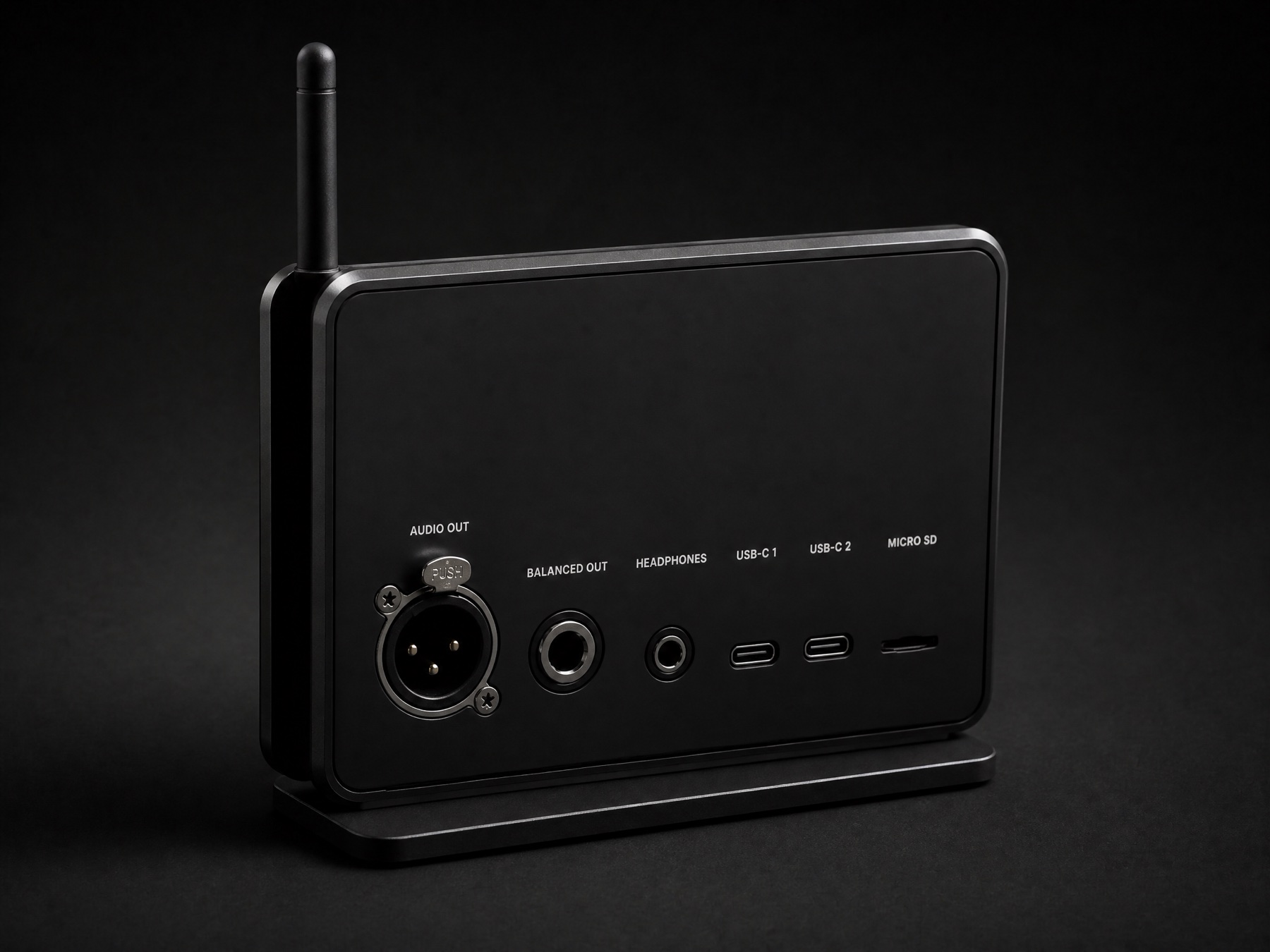
The back panel is a direct answer to something nobody in the survey asked for out loud, but everybody works around. One respondent runs a Bluetooth receiver into the board. Another runs an Alto Bluetooth box. A third hands the sound engineer a phone. A balanced XLR output means you hand the venue a proper cable and walk away, which is the difference between a professional handover and an apology.
The microSD slot is the dead-phone insurance. Two USB-C ports mean it powers and connects at the same time, so it is never choosing between charge and control.
It is on a dedicated radio link rather than Bluetooth, for the same reason theater rigs do not run on Bluetooth. And the whole thing is designed by the same people who write the app, so when you press a button, there is exactly one company responsible for what happens next.
Where this is in the process, honestly
The images above are industrial design concept renders, not production photographs. The Go Show Audio app is live on the App Store today and has been for months. The hardware is in active development with manufacturing partners, and we are not going to quote you a range figure, a price or a ship date until we have measured them ourselves and can defend the numbers publicly. Given what this survey taught us about how performers feel when a company overpromises and then walks away, that seemed like the only decent way to do it.
20The commitment
There is one finding in this research we think about more than the others, and it is not a market share number.
It is a working professional, in a room full of his peers, writing the words never trusting them again about a company whose product still physically works. His remote did not break. The company simply moved on and left him holding it.
Sixteen people in this survey are still running that hardware. One of them calls his own remote "legacy." One of them opened his up and modified it himself rather than replace it. These are professionals who look after their gear and expect their gear to look after them.
So here is ours, written down in public where you can hold us to it. When we ship hardware, we support it. Not until the next model launches. We would rather ship later and be worth trusting than ship early and end up quoted in somebody else's survey.
Thank you to every performer who answered. This was more useful than any focus group we could have paid for, and every single design decision above has one of your answers behind it.