The show music app for live performers
Every cue fires when you say, from the phone in your pocket. No WiFi, no wrong tracks, no notifications in the middle of your act.
$9.99 a month or $99.99 for life. 30 day money back guarantee.
Be honest
If you are a solo working pro, you know the feeling. One botched cue kills the illusion, the momentum and the booking that would have come next.
A call or a notification kills your audio. A music app auto plays the wrong track during a delicate moment. The audience notices, and the moment is gone.
Venue WiFi drops right before your walk on music. Hotel ballrooms, outdoor stages, cruise ships: the signal is never there when you need it.
Awkward silence while a volunteer fumbles with your iPad. Tiny buttons, the wrong track, an accidental swipe. You should not be thinking about tech under the lights.
Your invisible sound technician
Built by a working stage hypnotist who plays shows every week, for the moments a music app was never designed for.
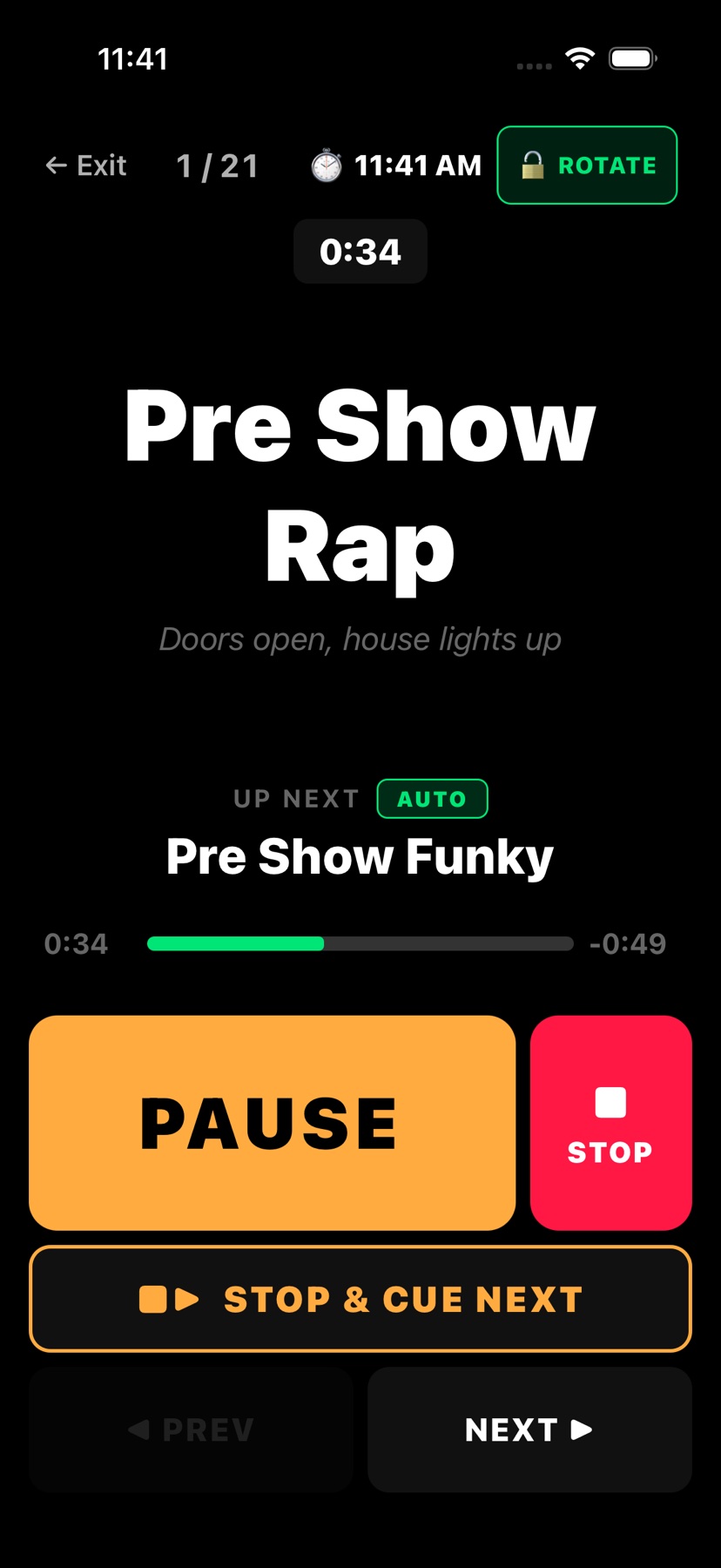
Wait for Go and Auto-Follow
The next song never starts before you do. Your reveal lands on your timing, not the app's.
Fades on every button
Music never cuts off dead, so your show sounds like it has a sound tech.
100% offline
No buffering, no calls, no notifications. Hotel ballroom, cruise ship or a field with no signal, it plays.
Bluetooth and USB remotes
Your audience never sees you touch a screen, and you know it works before doors open.
Every track, ready before you leave home
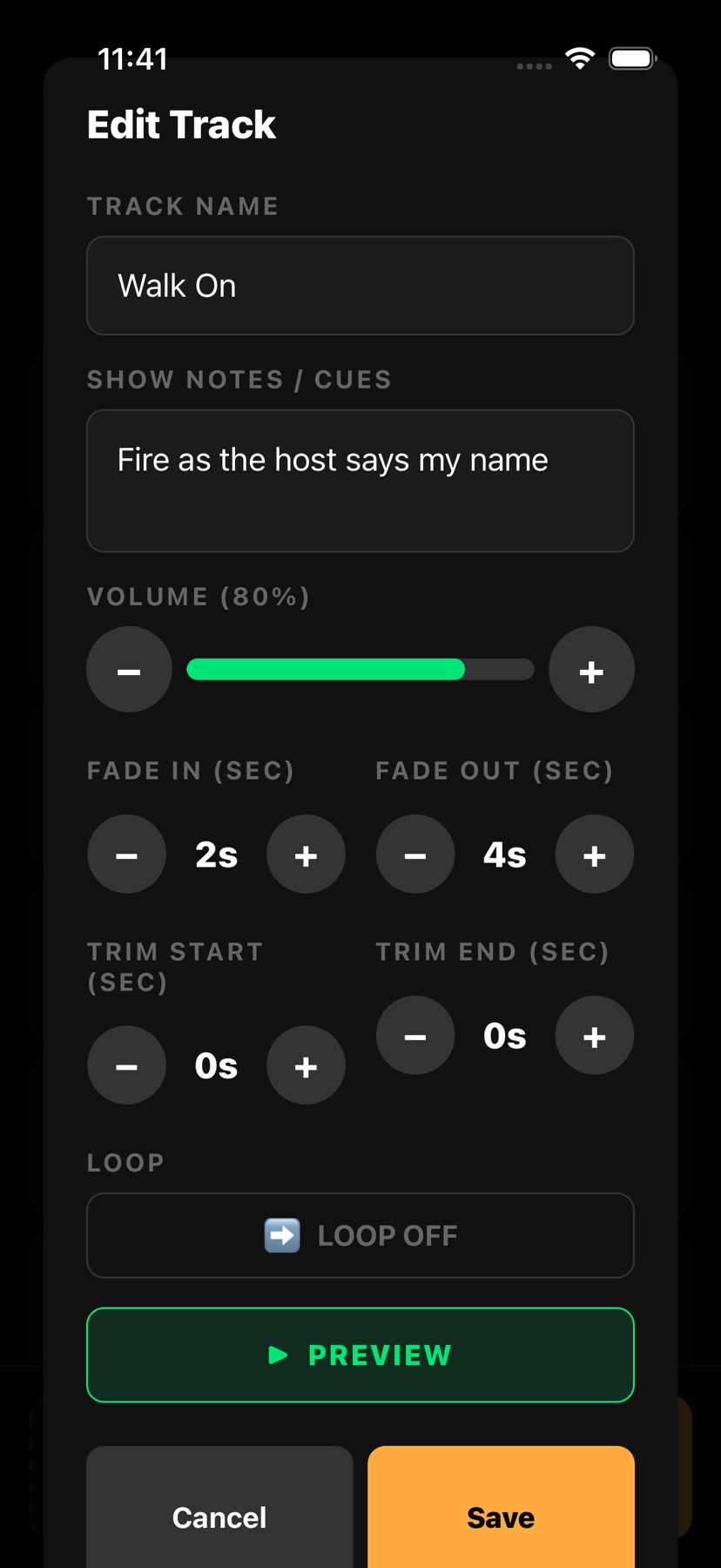
No audio editing software, and no reaching for the volume mid show.
Stage Mode
You can read it at a glance from across the stage, even under the lights.
A show for every gig
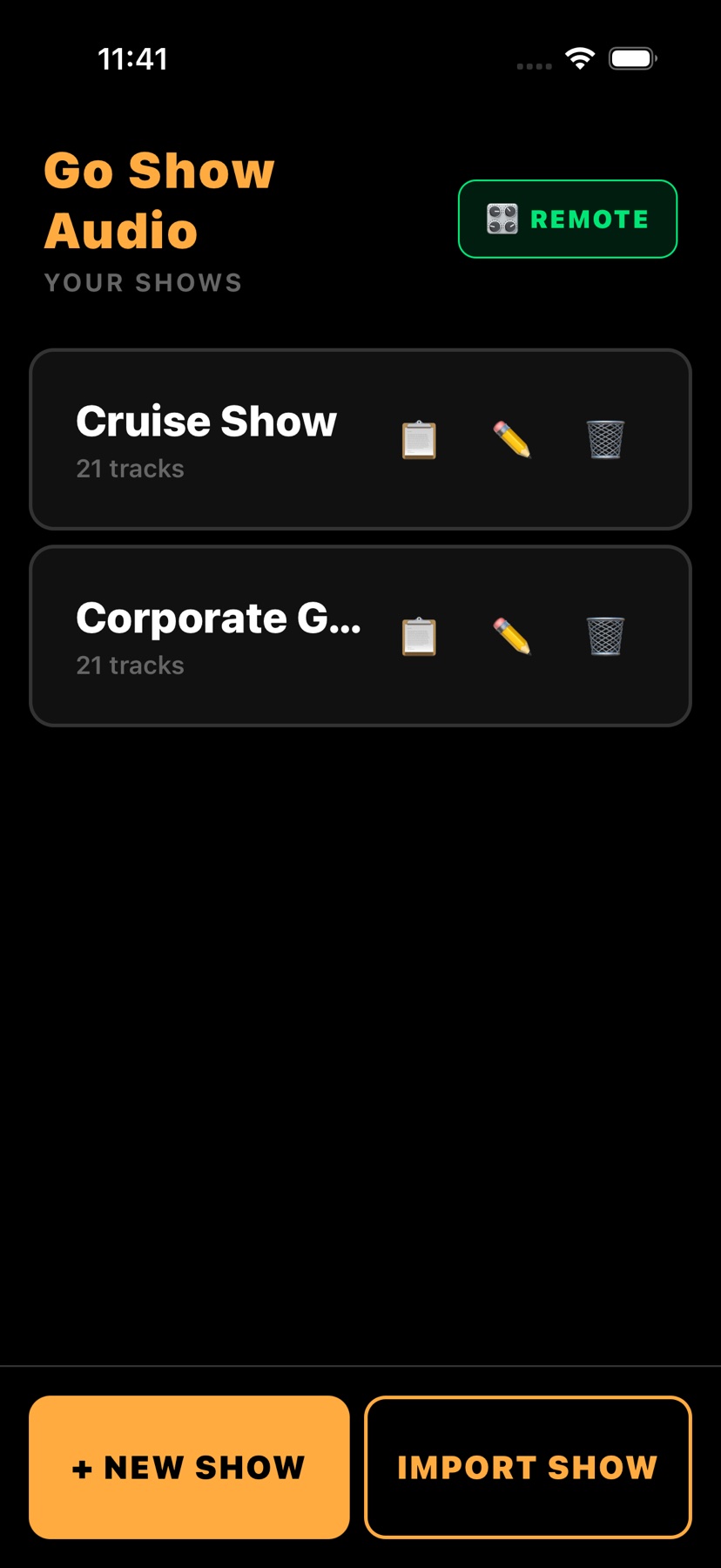
Corporate set, family show, late night set: switch in seconds without rebuilding anything.
Import a whole show in one go
Build your show on your computer, then load it onto your phone in seconds.
Bring the music you already have
Your show is on stage the same day you download the app.
See the app
Real screens from the App Store version. Designed to be read from across a stage.
How it works
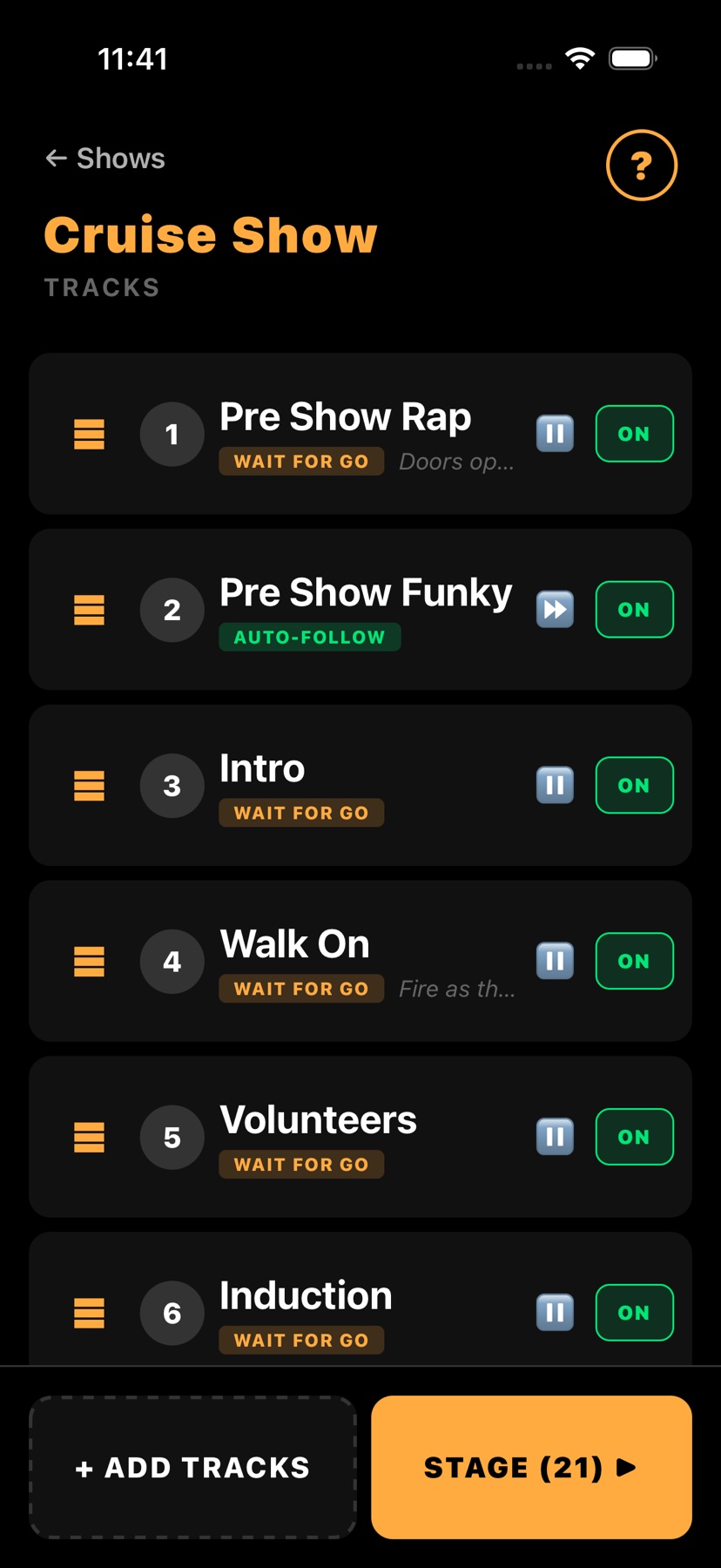
Name it, then tap + ADD TRACKS and pull your audio in from Files, iCloud Drive, Google Drive or your Apple Music downloads.
Drag tracks into order, set each one's volume, fades and trims, and choose Auto-Follow or Wait for Go.
Tap STAGE, switch on airplane mode, pick up your remote, and run the whole show without looking at the screen.
Built for live shows
If your performance depends on audio landing on time, this is your app.
Induction music on WAIT FOR GO, so nothing fires until the room is under. A fade on every button means a skit track never cuts off mid suggestion.
Cue the sting on the beat with a remote in your pocket. Trim each track to the exact second the reveal needs, and loop the bed under your patter.
Walk on music, applause stingers and walk off tracks in one show, fired from your phone or a remote while you hold the mic.
Scene changes, pre show music and sound effects in order, with cue notes on every track so whoever runs it knows exactly what comes next.
Also running every week for cruise ship performers, DJs, church worship teams, dance teachers, school shows, fitness classes and corporate event planners.
Offline and hands free
Everything Go Show Audio needs lives on your device, so a dead venue network changes nothing. Switch on airplane mode and the calls, texts and alerts that ruin a quiet moment simply cannot arrive.
Then put the phone down and take control from anywhere on stage. Pair a Bluetooth remote, clicker or foot pedal, or plug in a USB receiver remote. Tap REMOTE on the Shows screen to choose what each button does, then press a button on STAGE and watch it respond, before a single guest walks in.
New: the Go Show Audio Wireless Cue Remote. Pre-order at the founder price.
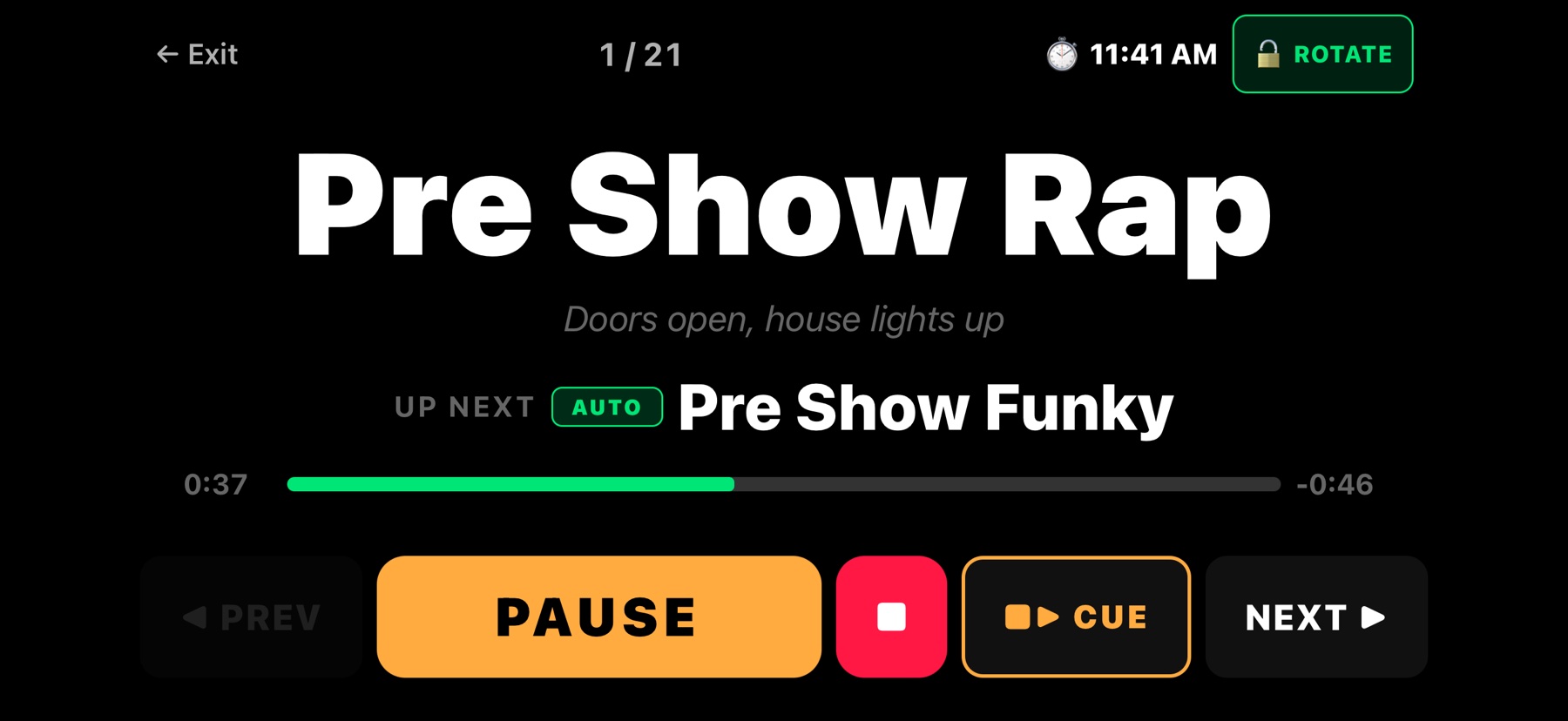
Stage Mode in landscape: the track, the time left and what is up next.
Why Go Show Audio
How it compares to what you are probably using now.
| Go Show Audio | Spotify or Apple Music | Laptop and QLab | |
|---|---|---|---|
| Works offline | ✓ Always | ● Downloads only | ✓ Yes |
| Cue based playback | ✓ Auto-Follow and Wait for Go | ✕ Play and skip only | ✓ Full cue lists |
| Remote control | ✓ Bluetooth and USB remotes | ✕ No | ✓ MIDI controllers |
| No interruptions | ✓ Airplane mode | ✕ Calls, ads, notifications | ● Possible pop ups |
| Fits in your pocket | ✓ iPhone or iPad | ✓ Phone | ✕ Laptop and cables |
| Stage friendly screen | ✓ Big buttons, dark mode | ✕ Tiny controls | ● Built for the tech booth |
| Learning curve | ✓ Minutes | ✓ Easy | ✕ Hours to days |
| Cost | ✓ From $9.99 a month | ● Monthly music plan | ✕ A laptop plus software |
What performers say
"I've used every audio app out there. Go Show Audio is the only one that actually understands what performers need. The remote control support alone is worth it."
"We run 3 shows a week at our theater. Being able to set up each show with its own playlist and just hit go has been a game changer for our sound tech."
"The airplane mode feature is huge. I perform on cruise ships where WiFi costs $15/hour. Now I don't even think about it, my audio just works."
"I used to sweat handing my tablet to the venue's sound guy. Go Show gives me complete control. My walk-up music and precise reveals hit perfectly every single time."
"Finally, an app that actually auto-pauses! It completely eliminated the anxiety of accidentally playing the next track during my hypnosis inductions."
"Our worship team runs backing tracks every Sunday. Go Show Audio replaced a laptop, a mixer, and a sound tech volunteer. Setup went from 20 minutes to under 3."
See it in action
Why standard music apps fail on stage, and how Go Show Audio gives you control you can trust.
The Go Show Audio Wireless Cue Remote
Five illuminated buttons made for the app: Play and pause, Next, Previous, Volume up and Volume down. Up to 30 m (98 ft) of range, up to 100 hours per charge. Every button is programmable in the app, and with two-press safety mode switched on, the first press lights the keypad so you can see the buttons and the second press fires the cue.
Pricing
Every feature on both plans. No hidden fees. Buy inside the app through Apple.
Billed monthly. Cancel anytime.
One payment. Yours forever.
Do not just test it in your rehearsal space. Take it on stage for your next three live gigs: your walk on, your background loops, your precision cues. If it is not the most stress free audio experience of your career, email us within 30 days and we refund every penny, no questions asked.
Free download
The step by step guide to setting up your first show and running it without a single missed cue. Free, straight to your inbox.
Where should we send your guide?
No spam, ever. Unsubscribe anytime.
Questions
Yes, 100%. Your audio files are stored on your device. Put your phone in airplane mode and your show runs exactly the same. If you use a Bluetooth remote, turn Bluetooth back on after switching airplane mode on.
MP3, WAV, M4A, AAC and AIFF. Import from the Files app, iCloud Drive or Google Drive, or add downloaded songs straight from your Apple Music library.
Yes. Tap + ADD TRACKS and choose Music Library to add songs you have downloaded to your device. Apple Music streaming tracks are copy protected by Apple, so only downloaded, DRM free tracks come across. If you pick a protected track, the app tells you it was skipped.
No. The app works with just your touchscreen. A remote is optional, for performers who want hands free control. Bluetooth remotes and USB receiver remotes both work. Tap REMOTE on the Shows screen to choose what each button does, then open your show on STAGE and press a button to check it before the show. Want one made for the app? The Go Show Audio Wireless Cue Remote is on founder pre-order now.
Every track has its own mode. WAIT FOR GO stops after the track and waits for you, nothing plays until you say so. AUTO-FOLLOW rolls straight into the next track with no gap. The next track's mode is honored however you advance: end of track, NEXT, or STOP & CUE NEXT.
Yes. Anywhere you need reliable, cued audio: theater productions, church services, corporate events, school performances and dance recitals.
Yes, on both iPhone and iPad. On iPad you get a much larger view of your tracks and controls, perfect for side of stage setups.
Yes. Fifteen free short videos walk you from sign up to performing live in Stage Mode. Watch them on the Tutorials page, or grab the free Setup Guide, sent straight to your inbox.
Your purchase is tied to your Apple ID. Download the app on your new phone and sign in with the same Apple ID. Keep each show's tracks in a folder in iCloud Drive and tap IMPORT SHOW to load the whole show again in one go.
Yes. Put all of a show's tracks in one folder in Files or iCloud Drive. On the Shows screen tap IMPORT SHOW, open the folder and tap Open. Tracks load in file name order, so number them (1, 2, 2b, 3...) to set the running order. Add a show file to the folder to set the show name and each track's settings too: auto-follow, loop, notes, volume, fades and trims.
Yes. Open the track, set Repeat to the number of plays you need (up to 20) and save. On stage, each PLAY starts it from the top, the screen shows PLAY 2 OF 7, and after the last play the show moves on. NEXT skips any plays left. LOOP is different: it repeats by itself, non-stop.
Yes. Plug your iPhone or iPad into your Mac, click it in the Finder sidebar, open the Files tab and drag your show folder (or its audio files) onto Go Show Audio. Then tap IMPORT SHOW, go to Browse, On My iPhone, Go Show Audio, open the folder and tap Open.
Yes. On the Shows screen (the first screen in the app) tap REMOTE. Set the center button to Play / Pause, Play / Stop, or Play / Stop and cue next, and set Next and Previous to fade the track out first or cut it clean. Switch on two-press safety mode and the first press only wakes the remote, the second fires the cue.
$9.99 a month, or $99.99 once for lifetime access. Both include every feature and every future update. Purchases are made through Apple inside the app.
Yes. Take it on stage for your next gigs. If it does not give you the most stress free audio experience of your career, email us at info@nationalentertainmentgroup.com within 30 days for a full refund, no questions asked. Monthly plans can be cancelled anytime.
Your next show
Your invisible, flawless sound technician is one download away.
Works on iPhone and iPad. 30 day money back guarantee.